

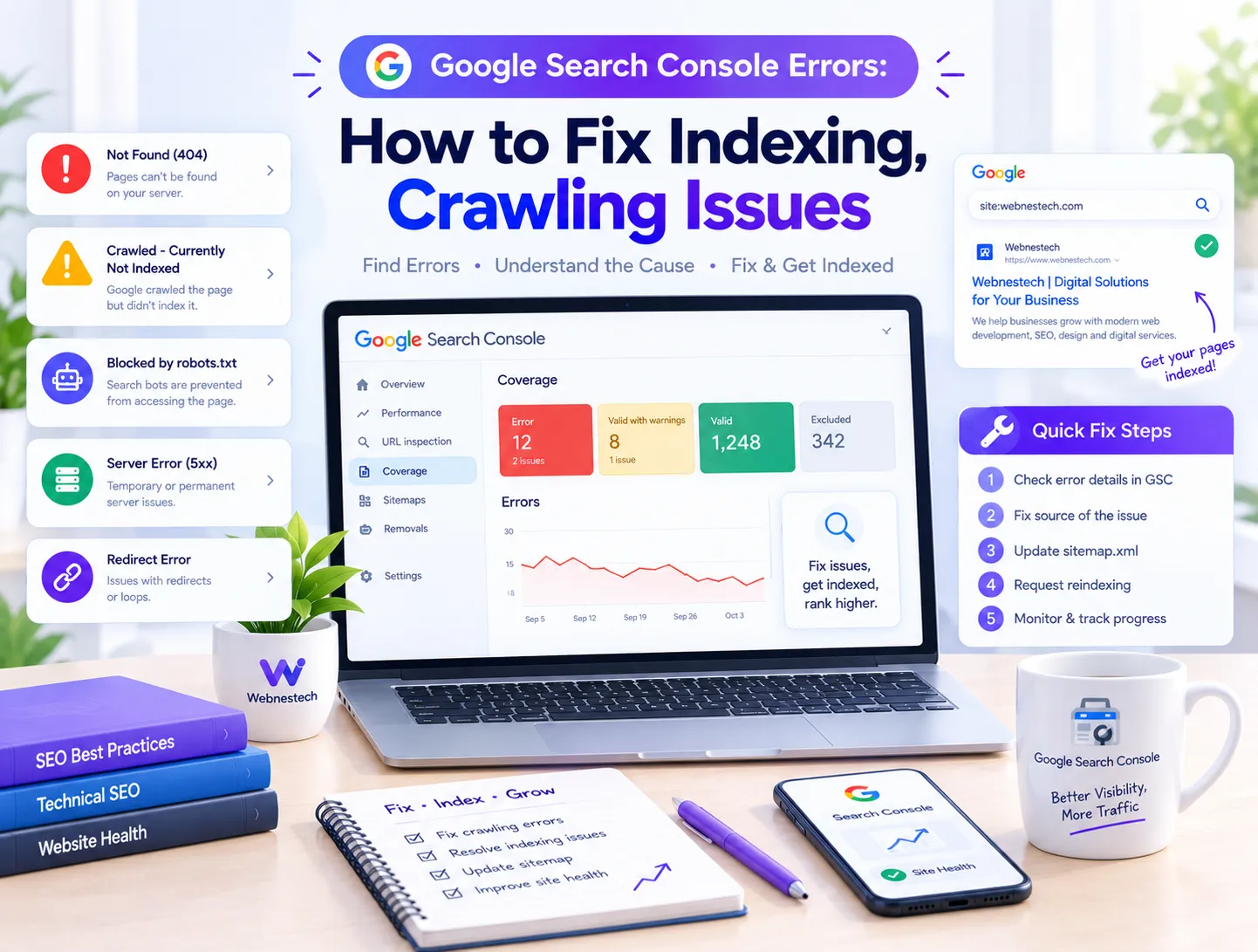
Google Search Console Errors Overview
Every website owner, publisher, and webmaster relies on Google Search Console (GSC) to track organic performance and technical health. However, encountering red warnings and coverage errors inside your dashboard can feel overwhelming. From indexation blocks and sitemap failures to broken structured data and mobile usability flags, unaddressed technical issues can severely limit your search visibility. Resolving these Search Console errors systematically is essential for maintaining strong domain health and organic keyword rankings.
Indexing and Coverage Fixes
Indexing issues represent the most common category of Search Console errors. When Googlebot encounters technical hurdles or quality signals that fall below its indexing thresholds, it flags pages under various status codes. Understanding these status codes allows you to apply precise fixes rather than making blind changes across your website architecture.
Crawled Currently Not Indexed
The "Crawled - currently not indexed" status indicates that search crawlers successfully fetched and analyzed your page but decided not to store it in the search index. This is typically a quality signal rather than a network error. To fix it, you need to expand thin articles, remove duplicate boilerplate text, and ensure the page provides unique value compared to competing URLs across the web.
Discovered Currently Not Indexed
The "Discovered - currently not indexed" error means search engines know your URL exists—usually discovered via your XML sitemap or internal links—but have not yet crawled it. This delay is usually caused by crawl budget constraints, slow server response times, or poor internal link architecture. Improving your server speed and linking to deep pages directly from main category pages speeds up the crawling queue.
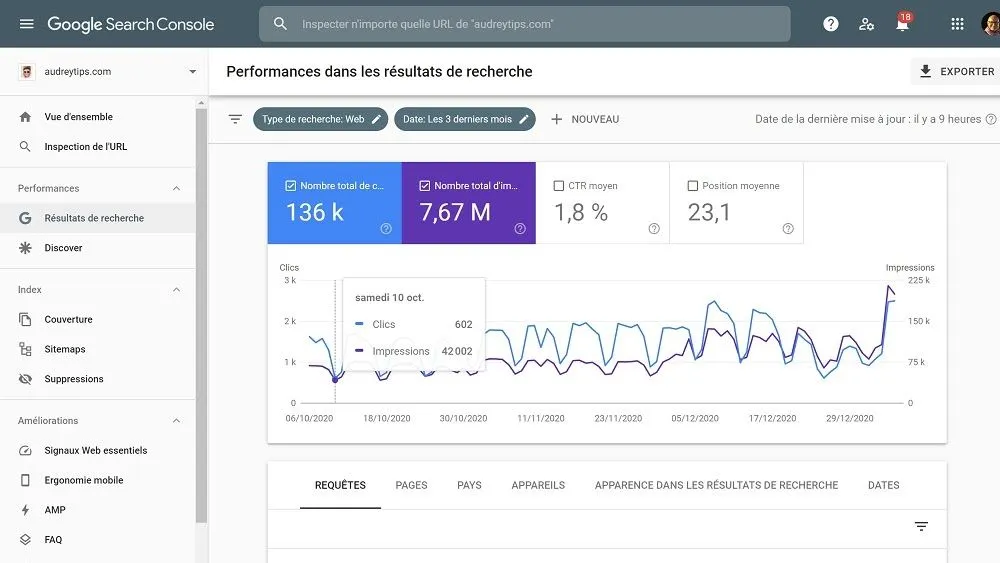
Monitoring coverage reports inside Google Search Console helps identify indexing gaps and technical bottlenecks.
Sitemap Errors and Exclusions
Sitemaps act as a direct map of your website's primary content. When GSC displays errors like "Sitemap couldn't be fetched" or "Sitemap contains URLs blocked by robots.txt," crawlers struggle to discover your latest articles. Ensure your sitemap index uses valid XML syntax, contains only 200-OK canonical status URLs, and excludes utility pages like login paths, tags, or draft previews.
Canonical Tag Mismatches
Canonical tag errors occur when search crawlers detect conflicting signals regarding which page is the primary version. Messages such as "Alternate page with proper canonical tag" or "Duplicate without user-selected canonical" mean Google selected a different URL as authoritative. Verify that every standalone page features a self-referential canonical tag and that parameter-heavy URLs point cleanly back to the root article.
Search Engine Optimization
Fixing complex technical issues across your domain requires an integrated technical strategy. Utilizing specialized SEO services helps eliminate crawl errors, resolve schema validation failures, and optimize site architecture so that search engines index every critical page without delay.
Structured Data Schema Errors
Rich result status reports highlight errors in your JSON-LD or Microdata markup, such as missing required fields in Article, FAQ, LocalBusiness, or Product schema. Unresolved schema errors prevent search engines from displaying rich snippets in search results. Using validated structured data generators and testing code inside Google's Rich Results Test ensures your schema parses cleanly without syntax errors.
Mobile Usability Warnings
Mobile usability errors—such as "Text too small to read," "Clickable elements too close together," or "Content wider than screen"—directly harm mobile search performance. Because Google enforces mobile-first indexing, responsive design failures across your templates degrade page experience scores. Using mobile-friendly CSS frameworks and setting explicit viewport tags resolves these rendering warnings.
Clean site architecture and fast server response times ensure search engine crawlers process your pages efficiently.
GSC Error Troubleshooting Guide
To resolve Search Console warnings quickly, you must identify the primary root cause behind each notification and apply the corresponding technical fix.
Search Console Error Matrix
The following table outlines major Google Search Console error categories, their underlying causes, and practical solutions:
| GSC Error Category | Primary Underlying Cause | Recommended Action Step |
|---|---|---|
| Crawled - currently not indexed | Thin content, duplicate text, or low quality signals | Expand article depth, add stats, and provide unique value |
| Discovered - currently not indexed | Crawl budget limits or weak internal link structure | Add contextual internal links from high-authority pages |
| Sitemap Couldn't Be Fetched | Server timeout, invalid XML syntax, or path error | Validate XML structure and resubmit sitemap URL in GSC |
| Blocked by robots.txt | Disallow directive in robots.txt blocking crawlers | Update robots.txt rules to allow crawling of target URLs |
| Invalid Schema Markup | Missing required schema attributes or syntax error | Fix JSON-LD fields using the Rich Results Test tool |
| Server Error (5xx) | Host server downtime or PHP database execution limits | Increase server memory allocation and fix backend scripts |
Digital Growth Services
Building a search-optimized web presence requires balancing technical precision with user experience. Partnering with a dedicated agency like Webnestech ensures your technical architecture, digital assets, and performance infrastructure meet modern web standards.
URL Inspection Tool Diagnostics
The URL Inspection Tool inside Search Console is your core diagnostic engine. Inputting any published URL allows you to test live rendering, check indexed HTML code, verify HTTP response headers, and inspect canonical assignments. Whenever you deploy technical fixes to an error-flagged page, use the "Validate Fix" button or submit a manual indexing request to accelerate Google's recrawl cycle.
Server Errors and 5xx Statuses
Server errors (500, 502, 503, 504) occur when Googlebot attempts to reach a page but your web hosting server fails to render a response. Frequent 5xx errors signal server instability or database crashes during high traffic volumes. Upgrading hosting environments, implementing caching layers, and optimizing database queries prevent crawler timeouts.
Maintaining backend stability prevents 5xx server errors during search engine crawling passes.
404 and Soft 404 Resolution
A standard 404 error indicates a page has been removed, which is natural when content is intentionally deleted. However, a "Soft 404" occurs when a page returns a 200-OK HTTP status code while displaying an empty or blank template to users. Ensure deleted pages return a true 404/410 status code or implement 301 redirects to relevant replacement URLs.
Redirect Chain Auditing
Redirect errors occur when Googlebot encounters redirect loops, broken destination links, or excessive redirect chains (Page A -> Page B -> Page C). Redirect chains waste crawl budget and slow down page loading speeds. Update internal links and sitemaps so they point directly to final 200-OK destination URLs.
Search Console Audit Roadmap
Maintaining a clean Search Console account requires systematic troubleshooting. Start by resolving 5xx server errors and sitemap delivery issues. Next, clean up 404 pages and canonical mismatches. Finally, improve thin or unindexed pages with deep content updates to ensure every live URL passes Google's quality standards.
Long-Term Search Health
Technical search management is an ongoing process rather than a one-time project. Auditing Search Console reports monthly, monitoring indexing ratios, and maintaining clean code ensures your domain stays healthy, crawlable, and prepared for future search engine algorithm updates.
Frequently Asked Questions
Key answers regarding Search Console errors, coverage issues, and technical fixes.
Fix this status by enhancing the article's depth, eliminating boilerplate or duplicate text, adding original analysis, and ensuring the URL offers clear value compared to existing web results.
This error usually stems from an incorrect sitemap URL path, server access restrictions, or temporary crawler timeouts. Verify your sitemap XML syntax and resubmit the URL in GSC.
A Soft 404 occurs when a page appears empty or missing to users but sends a 200-OK status to search engines. Fix it by adding relevant content or returning a proper 404 HTTP status code.
Validation times vary depending on site traffic and crawl frequency. Once you click 'Validate Fix' in GSC, verification typically takes between a few days to two weeks.
While schema errors do not directly lower standard rankings, they prevent your pages from earning eye-catching rich snippets, reducing your search listing click-through rates.
Ready to solve Search Console errors and boost your organic visibility?
Work with expert strategists to optimize your technical architecture and search performance.