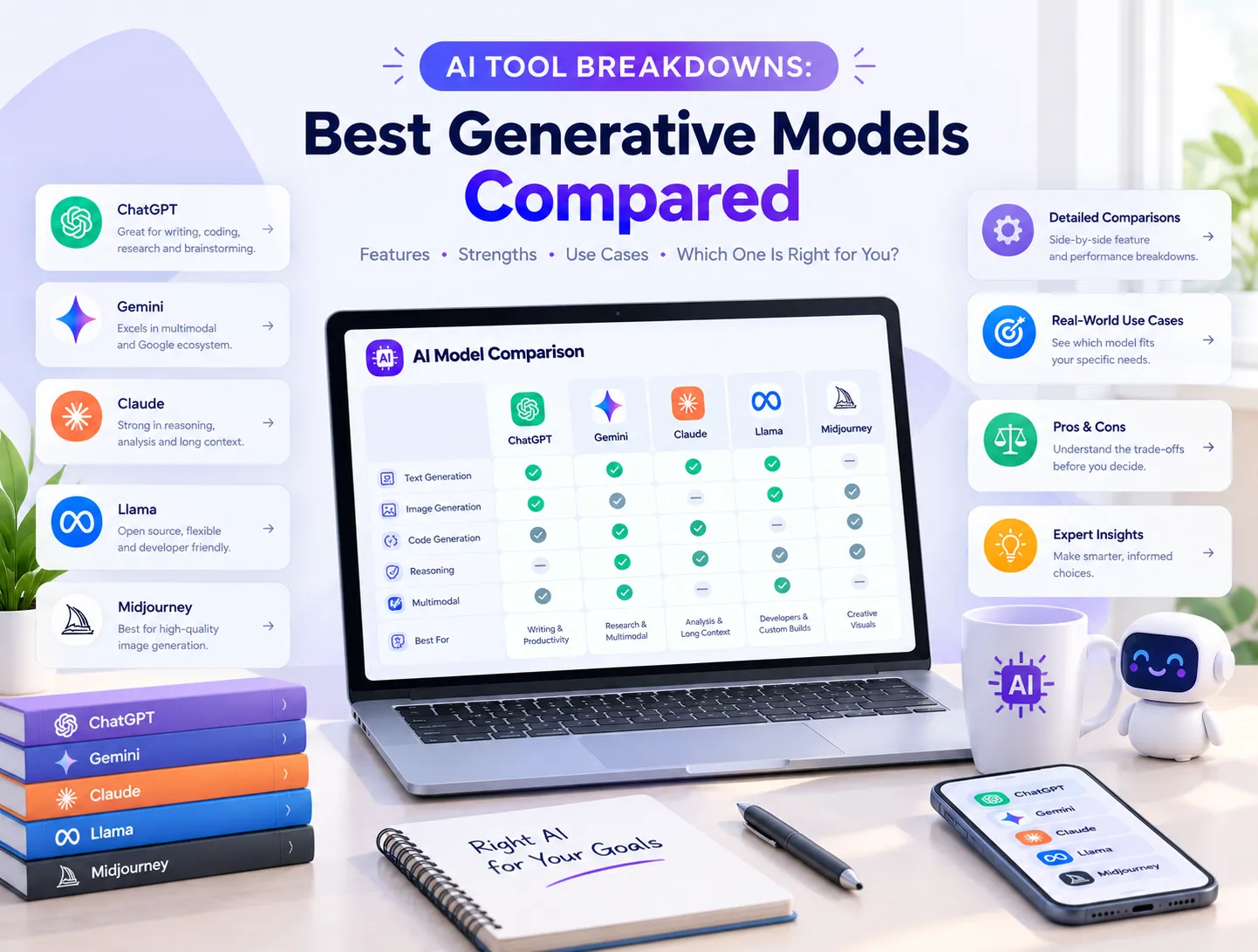
AI Tool Breakdowns: Best Generative Models Compared
Artificial intelligence models and digital assistants evolve at an astonishing pace, making it difficult for professionals, creators, and business owners to choose the right platform. Whether you are scaling operations across our broader digital agency portfolio, managing automated workflows, or looking to supercharge your daily content creation, understanding the strengths of modern generative AI tools is essential. Navigating the crowded landscape of LLMs and productivity assistants requires a clear, objective breakdown of what each platform actually delivers in real-world scenarios.
Why Choosing the Right AI Productivity Assistant Matters
Deploying the wrong generative AI stack leads to wasted subscription costs, frustrating context limits, and inefficient workflows. While some platforms excel at long-form writing and deep code analysis, others specialize in real-time web research, workspace collaboration, or multimedia generation. Evaluating top-tier AI models side-by-side helps individuals and teams optimize their software investments, eliminate repetitive administrative friction, and maximize daily output.
Core Criteria for Assessing Generative AI Models
- Context Window Capacity: Measure how many thousands of words or lines of code a model can analyze in a single prompt.
- Reasoning & Logic Depth: Assess how accurately models handle multi-step problem solving, math, and code debugging.
- Ecosystem Integration: Check compatibility with third-party software, office suites, and cloud platforms.
- Multimodal Capabilities: Determine how smoothly the assistant handles voice interactions, file uploads, and image generation.
- Pricing vs. Value Ratio: Analyze whether paid tier subscriptions deliver a measurable return on investment for your daily tasks.
1. OpenAI ChatGPT: The Versatile All-Around Assistant
OpenAI's flagship assistant remains the default standard for millions of users worldwide due to its unmatched versatility and large integration ecosystem. Combining advanced reasoning engines, built-in image creation, web browsing, and custom assistant configurations, it functions as a reliable Swiss Army knife for general workplace tasks. Leveraging our browser tools alongside advanced LLMs allows creators to process media and generate text smoothly in one unified session.
Practical Workflows for OpenAI ChatGPT
- General Content Drafting: Rapidly outline articles, marketing emails, and social media copy.
- Interactive Brainstorming: Generate creative campaign angles and problem-solving frameworks on demand.
- Quick Coding Assistance: Debug snippets, explain complex code blocks, and write basic scripts fast.
- Multimodal File Analysis: Upload spreadsheets or reference charts to extract key insights instantly.
2. Anthropic Claude: The Master of Long-Form Reasoning and Prose
Developed by Anthropic, Claude has carved out a dominant position among professional writers, researchers, and software engineers who value nuance, academic rigor, and natural tone. Featuring a massive context window capable of ingesting entire book manuscripts or massive codebases at once, Claude excels at complex document synthesis and careful, multi-step analysis without hallucinating minor details.
4 Steps to Leverage Claude for Deep Technical Work
- Compile your reference reports, research papers, or documentation into a single folder.
- Upload the reference files into a dedicated Claude Project workspace.
- Prompt the model to cross-examine data sources, highlight discrepancies, or draft detailed summaries.
- Use interactive artifact panels to edit, format, and export structured code or prose.
3. Google Gemini: The Ultimate Ecosystem Companion for Teams
Google Gemini integrates deeply across cloud environments and productivity apps, making it the premier choice for organizations deeply embedded in Google Workspace. By pulling context directly from user emails, documents, shared drives, and live web indices, Gemini minimizes tab-switching and brings real-time search capabilities straight into daily document creation and communication channels.
Feature Matrix: Comparing Leading AI Productivity Models
| AI Platform Name | Primary Strength | Context Capacity | Best Suited For |
|---|---|---|---|
| OpenAI ChatGPT | All-around versatility & ecosystem | High (128K+ tokens) | General creators & multi-taskers |
| Anthropic Claude | Long documents & nuanced prose | Massive (1M+ tokens) | Writers, analysts, & developers |
| Google Gemini | Workspace search & cloud sync | Very High (Enterprise scale) | Google Workspace power users |
| Perplexity AI | Conversational cited search | Dynamic web index | Researchers & fact-checkers |
| Notion AI | Embedded database & note management | Workspace connected | Remote teams & documentation |
4. Perplexity AI: The Search-First Knowledge Discovery Engine
Traditional search engines often force users through cluttered pages filled with sponsored ads and SEO padding. Perplexity revolutionizes information retrieval by combining conversational AI prompts with real-time web indexing, providing concise, synthesized answers backed by verifiable inline citations. It serves as an indispensable tool for competitive market research, technical fact-checking, and rapid industry trend analysis.
When to Use Perplexity AI Over Traditional Chatbots
- Competitive Intelligence: Quickly analyze competitor product releases, pricing shifts, and industry news.
- Fact-Checking Claims: Verify statistics and data points with direct links to primary source documents.
- Technical Troubleshooting: Find immediate software documentation fixes without scrolling through forums.
- Trend Monitoring: Stay updated on fast-moving global news topics with structured summaries.
5. Notion AI: The Second Brain for Team Collaboration
Rather than acting as a standalone chat window, Notion AI embeds intelligence directly inside the notes, databases, and project documents your team already uses every day. It automatically summarizes messy meeting transcripts, generates action items, restructures messy documentation, and searches across connected workspace pages to surface critical institutional knowledge instantly.
Why AI Tool Integration Drives Modern Digital Efficiency
Adopting the right mix of generative AI assistants transforms how businesses handle daily operations, content pipelines, and customer communications. By automating routine text synthesis, data extraction, and research tasks, teams free up valuable hours to focus on strategic execution, high-level creative design, and technical engineering growth.
5-Step Checklist for Implementing an AI Productivity Stack
- Audit your daily workflow bottlenecks to identify repetitive writing or research tasks.
- Select a primary general-purpose conversational model like ChatGPT or Claude.
- Integrate a dedicated search engine like Perplexity for fast fact-checking.
- Connect workspace-native tools like Notion AI or Gemini to organize team knowledge.
- Monitor time savings and adjust your subscription stack to maximize overall efficiency.
Streamline Your Digital Workflow With Webnestech
Navigating modern generative AI platforms and scaling digital applications requires specialized expertise and robust technical infrastructure. Whether you want to optimize your web assets, build custom software solutions, or elevate your online presence, our expert team is ready to assist. Feel free to get in touch with our team today to discuss your next digital project.
Frequently Asked Questions
Essential answers regarding generative AI models, productivity tools, and software selection.
OpenAI ChatGPT is widely considered the best all-around assistant due to its balanced reasoning, large plugin ecosystem, and versatile multimodal capabilities.
Claude offers an exceptionally large context window and a natural writing style, making it superior for analyzing entire book-length files and technical reports without losing context.
Perplexity combines conversational AI with real-time web search, synthesizing direct answers backed by verifiable inline citations rather than forcing you to click through ads.
Yes, Gemini excels for Google Workspace users because it pulls contextual data directly from supported Google apps, docs, and emails.
Most users benefit from pairing one general reasoning model (like ChatGPT or Claude) with a search-first tool (like Perplexity) depending on their specific professional workflows.
Ready to elevate your digital infrastructure and AI workflows?
Partner with our expert development team to scale your business presence.